PR Labeller
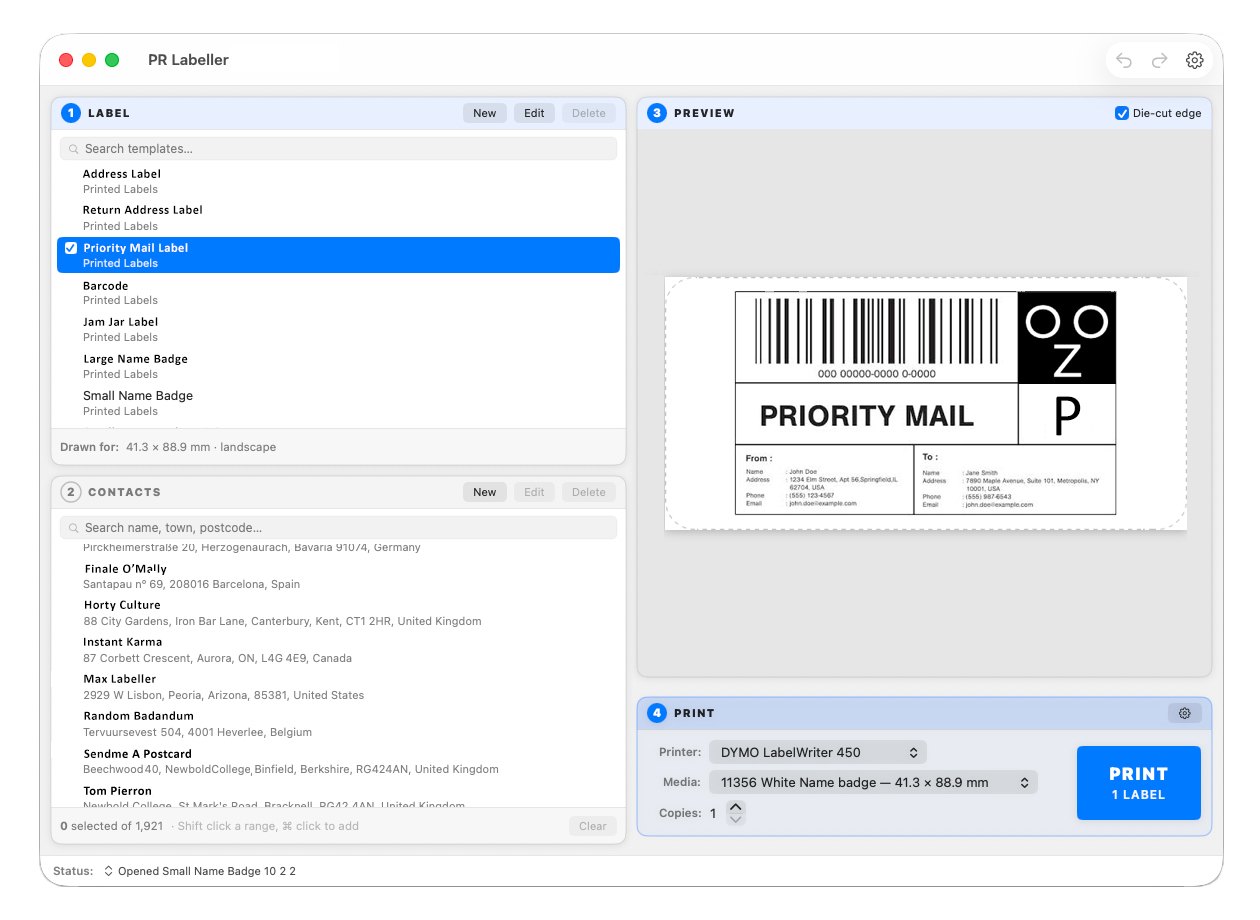
A native label editor for the Mac. It opens the label files you already have and prints through the driver you already have.
No Rosetta. Nothing else in your setup has to change.
Why this exists
If you print labels on a LabelWriter, the software you use is probably an Intel application, and Apple is retiring Intel support.
| Version | What happens to an Intel app |
|---|---|
| macOS 26.4 | Every launch warns that it will stop working. Repeatedly. |
| macOS 27 | The upgrade removes Rosetta. Opening an Intel app then brings up a prompt offering to install it again — which, when your labelling software suddenly refuses to open, looks exactly like it is broken. Confirmed on a machine upgraded on release day. |
| macOS 28 | It stops. |
The printer was never the problem. The LabelWriter driver has been universal for years. Only the application was Intel-only. So the sensible answer is to replace the application, not the printer.
PR Labeller — "Post Rosetta" — is that replacement. It reads and writes the same files, and prints through the same driver.
What it does
- Opens your existing labels and renders them faithfully. Every one of the 133 label files used to develop it renders pixel-identically to the reference, and saving one back produces a byte-identical file. Your templates are working assets; software that quietly reformats them is not tidying up, it is losing your work.
- Prints to the printer and stock your own driver reports, one label or a run of them.
- Fills in addresses from an existing address book
(
.abx) or a CSV, one contact or a list. - Edits and creates — text, addresses, pictures, barcodes and shapes, with alignment, snapping, layering and unlimited undo.
- Rotates freely, at any angle rather than only right angles.
- Prints straight. An alignment test and sub-millimetre offsets, because every machine grips the stock slightly differently and no amount of software can guess by how much.
Read the help — the same page that ships inside the app.
Questions people are asking
My DYMO label software has stopped working on my Mac. What happened?
Almost certainly Rosetta. DYMO's label software is an Intel application, and Apple is retiring the translation layer that lets Intel software run on Apple Silicon. Upgrading to macOS 27 removes Rosetta, so the app will not open until you accept a prompt offering to install it again — which looks exactly like the software has broken. Apple's own wording in that prompt is blunt about what comes next: “Intel-based apps requiring Rosetta will not open in macOS 28, the next major release.” Nothing is wrong with your printer and nothing is wrong with your Mac.
Is there an Apple Silicon version of DYMO Label?
No. There is no Apple Silicon build of DYMO Label v8, and none of DYMO Connect either. Both are Intel-only.
Will installing DYMO Connect fix it?
No — that is the most common piece of advice on this subject and it does not work, because Connect is Intel-only too. It will run today under Rosetta and stop at the same point v8 does.
Do I have to buy a new label printer?
No. Your LabelWriter is fine. Its driver has been universal — native on Apple Silicon — for years. Only the application was stuck, which is what this replaces.
Will it work on my M1, M2, M3 or M4 Mac?
Yes, natively, with no Rosetta involved. It also runs natively on Intel Macs; the download is a universal build.
Will it open the labels I already have?
Yes, if they are .label files — DYMO Label v8's format. It opens
and saves them without altering them: of the 133 label files used to develop it,
every one renders pixel-identically to its reference and saves back
byte-identical. Files created by DYMO Connect are a different format and are not
supported.
Can I still use my address book?
Yes. It reads DYMO address books (.abx) and plain CSV files,
prints one label or a run of them, and lets you edit contacts with dated backups
taken before every change.
Do I have to buy special labels?
No. PR Labeller changes nothing about your stock. It asks your own printer driver what sizes it takes and offers you exactly those.
The deal, before you download
Free and fully unlocked until 1 March 2027
Everything works during the beta, so that everything gets used and everything gets tested.
After that it does not stop
Free for ever: opening and printing your existing labels, choosing the printer and stock, up to five copies at a time, picking an address from your address book, the alignment test and the diagnostics. That is the job this was written to do, and it is not going behind a payment.
Included in 1.0 (£9.99, one payment): creating and editing labels, rotation, shapes, editing contacts, and printing a run from several contacts at once.
Everyone who uses the beta gets 1.0 free
This is all said here, before you download anything, on purpose. Discovered afterwards it would be a bait and switch; said up front it is simply the deal.
There is no account, no activation and no server. Nothing here phones anywhere, and nothing stops working because a website went away.
Requirements
- macOS 14 or later, on Apple Silicon or Intel
- A LabelWriter with its driver installed — the same driver you use now
If it will not open
Three things account for nearly all of it, in the order worth trying.
Drag it to Applications first. Opening it from the mounted disk image can fail outright, and when it does work the app is in a read-only holding area where it cannot remember anything.
macOS may ask you to confirm the first time. Anything you download carries a quarantine flag, and macOS checks it once before it will run. The app is signed with an Apple Developer ID and notarised by Apple, so this should be a single confirmation rather than a refusal. If macOS says it cannot be opened, go to System Settings ▸ Privacy & Security, scroll down, and use Open Anyway.
Check your macOS version. It needs macOS 14 or later. On an older system it will not start at all.
If none of that is it, please tell me what you saw — see Something wrong? below. A description of what happened is worth more than a guess at why.
What this is not
PR Labeller is an independent program. It is not made by, endorsed by, or connected to Sanford, L.P. or its subsidiaries. DYMO is their trademark, used here only to say plainly which files this program reads and which printers it prints to.
It contains none of their software — no templates, no stock catalogue, no driver files. Every label size it offers is read from the driver already installed on your own Mac, every time it runs.
It is not on the App Store. The App Store requires the sandbox, and the sandbox forbids both reading the printer driver's own configuration and the print path that was proved correct against real hardware. So it is distributed directly instead — signed with an Apple Developer ID and notarised by Apple, which is what lets it open in one step rather than behind a warning about unverified software.
On label rolls. Some newer LabelWriter models accept only rolls the printer itself recognises. That is decided inside the printer's own firmware, before this program is involved at all.
PR Labeller does nothing about it, and never will. Not as an option, not as a plug-in, not on request. Please do not ask.
Something wrong?
In the app: Settings ▸ Diagnostics ▸ Send, or Help ▸ Report a Problem. It opens a message with a technical summary already in it — versions, your printer and its driver, the label sizes the driver offered, and the alignment in use.
It contains no addresses, no contacts and nothing from your labels, and nothing is sent by the app: you read it, delete anything you would rather not send, and press send yourself. Say what you were doing, what you expected, and what happened instead — that sentence is usually worth more than everything underneath it.
Or write to prlabeller@gmail.com. If clicking that does nothing, your Mac has no mail application set up — copy the address and write from wherever you normally read your mail. The link failing is silent, so it is worth saying: if no message window opened, nothing was sent.